





Category: Internet

Fiber Optic Internet to Increase Your Home Value

Fiber Optic Internet to Increase Your Home Value

Do you own your home? How much value do you have? There are endless improvements that could help to add value, but what about your internet connection? Studies have shown that a fiber optic internet connection can help to increase the value of your home. Whether you have renters or are the ones residing in your home access to a fiber optic internet connection can help to increase your homes overall value.

So, What is Fiber Optic Internet?

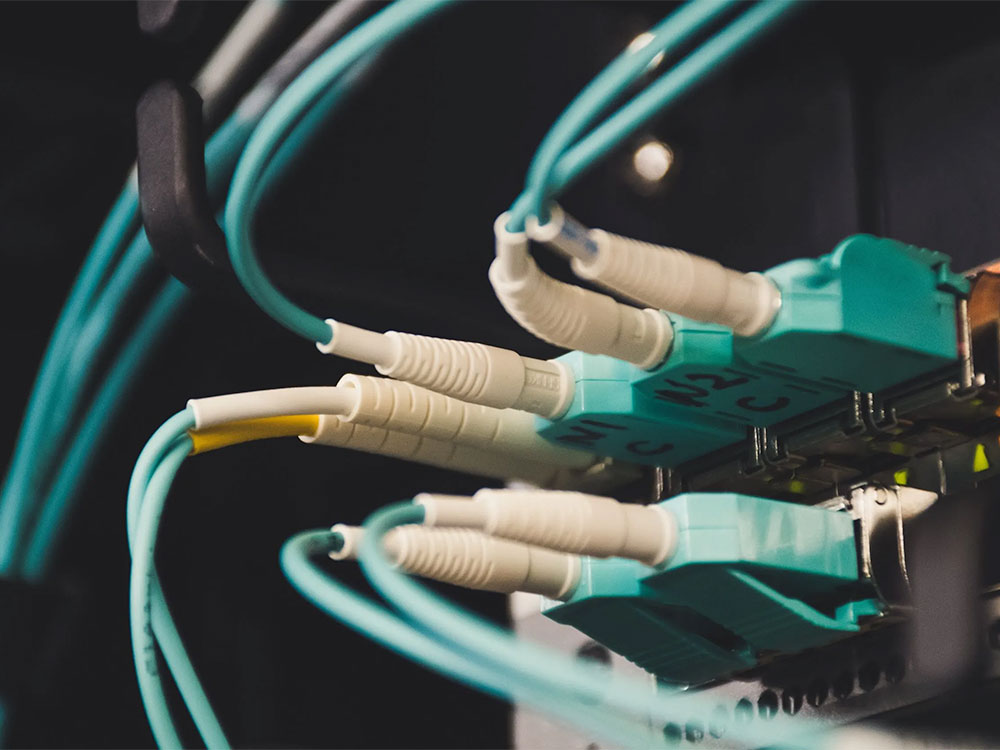
Fiber optics is the technology that is used to transmit information as pulses of light through strands of fiber made of glass or plastic over long distances. Each optical fiber size is the diameter of a strand of human hair and when bundled all together they create a fiber-optic cable that is capable of transmitting more data over longer distances and faster than other mediums.

So, What is Fiber Optic Internet?

In 2015, a Study conducted by the Fiber to the Home Council Americas (FTTH), an advocacy group made up of fiber equipment vendors and broadband providers, show that fiber may increase a home’s value by up to 3.1 percent.
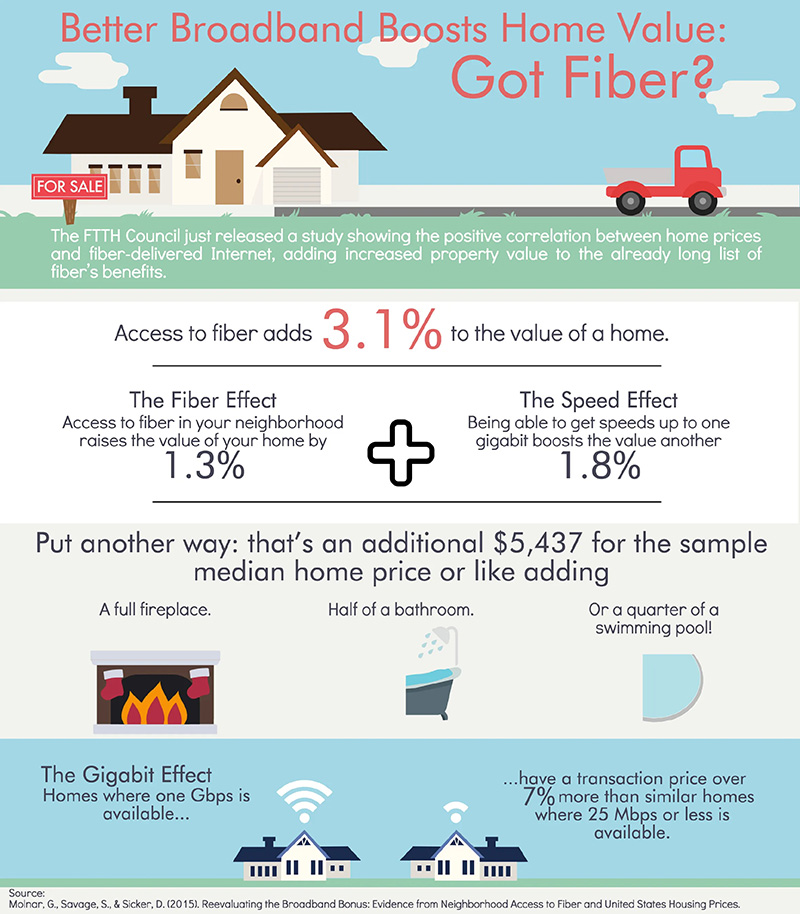
Fiber to the Home Council Americas (FTTH) Study

Other Added Benefits to a Home Fiber Connection

Speed, Speed, Speed! There is nothing more annoying than having to wait for a website to load or a show on Netflix. With fiber optics you can get a better connection that improves efficiency and provides faster upload/download speeds.

In addition to higher speeds, fiber optics provides resistance to electromagnetic Interference. Electromagnetic interference can occur when there is any device that emits a signal. In many typical households this could include microwaves, radios, wireless telephones, Bluetooth speakers, etc. While repositioning your route can help to fix these interferences, a fiber connection would mean you do not have to go through that hassle; Because fiber optics are made from glass or plastic, those materials are not affected by electromagnetics. Also, since fiber optic cables do not contain metals, they are often non-conductive in nature and this helps to eliminate any potential spark hazards.

Furthermore, fiber optic connects can help to lower your security risk online. This benefit is due to the way communication/data is transmitted. As the speeds for fiber approach the speed of light, it makes data signals much harder for hackers or malicious individuals to intercept the information being transmitted.

Is Internet access an Essential Service during a time of disaster?

Is Internet access an Essential Service during a time of disaster?

Monday this last week I was on a phone call with several other Internet Service Providers (ISP) and leaders in the telecommunications sector. The discussion was around where ISPs stand in the big picture, and if we are an essential service.

Last week, the State of Pennsylvania was the first to announce businesses that are not considered ‘life-sustaining’ are ordered to close.

California, New York State, along with many others followed suite with an order to keep all workers home for nonessential businesses.

Oregon also created the ‘Stay Home, Save Lives’ order which has closed all non-essential businesses effective 3/25.

In all the uncertainty around us right now, we all need communication with one another to ensure that we are getting the information we need, the work done we need to, or just to have a distraction from the cabin fever we may be experiencing!

Alyrica is considered an essential service by the Department of Homeland Security, the World Health Organization and others

That conference call on Monday was an eye opener for me. I knew that the work we do everyday matters and we provide a great service to our community. I realized that what we are doing now, more than ever, is crucial for our customers and our community.

Many people can’t work from home due to the nature of their work and I understand that. With schools all moving online for the foreseeable future, it brought an even greater need than thought originally.

Here is a great explanation on “What are Essential Services?” as well as an outline of the Department of Homeland Security’s Critical Infrastructure Sectors.

For our customers and our businesses; Alyrica is here for you through this ordeal.

I have heard in other parts of the world that the Internet is getting saturated; what is Alyrica doing to mitigate that?

Every part of the world is seeing an increase in internet traffic. Some are even wondering if the internet as a whole can handle such an increase in demand. To calm those fears; the internet is not going to implode on itself.

Alyrica builds and maintains its own network. This means that we do not go over third-party ‘subscriber lines’ to people’s houses like other providers might do. What that means for our customers is that we have control over the end user experience.

Since we are continually upgrading and making our network more robust with more headroom and multiple paths to ‘the internet’ we are in the best possible position as traffic increases.

We certainly have seen an increase in traffic over the last couple weeks, but we are in a great position in terms of overall bandwidth. We are sure to see even more drastic increases on our network and we have the capacity to handle it.

As demand continues to increase, what are the bottlenecks and what can people expect in the months and years to come?

The bottleneck for most internet users is in the ‘last-mile’ which I talk about at length here: Internet Delivery Methods.

The last mile to each individual customer is where the pain point is for people. For example if Alyrica has 4 upstream or ‘middle-mile’ 10 Gbps fiber optic paths to ‘The Internet’ that is not the bottleneck since total traffic demand during peak hours is less than 20% of those upstream paths. This is true for most networks, hence, the issue being the ‘last-mile.’

Alyrica’s last mile is either fiber-optic or fixed wireless. For our fiber optic customers they will not have any issues at all in term of capacity or transport to their residence or business and the most common issue they will experience is the WiFi inside.

Our fixed wireless towers have the limitation of frequency allocation and access point (AP) capacity. We continually monitor each AP’s capacity to ensure that our customers do not see their connection slow down. We are not perfect by any means, but we are committed to staying ahead of this curve.

What do I need to do if I am on a limited connection or I am not getting the speed I need to work or do school?

First off, I encourage our customers to give us a call! There are many times we hear from customers that have been suffering with slow speeds for weeks before they give us a call. We do our best to monitor the health of the network, but for the individual user, we don’t monitor individual connections and don’t know if people are having a hard time until they call us!

Common issues break down into a few buckets:

  • WiFi Issues: This is the most common support call we receive; one device is not working like it should. We can help troubleshoot to find the device and see if the WiFi is strong enough throughout the house. We have a service called Whole Home WiFi that can help here.
  • Maxing out the plan: We see this fairly frequently as well. Right now we are seeing this frequently as families are all working/doing school from home simultaneously. These multiple streams (if they are video conferencing) will use more bandwidth. We don’t sell people more than they need, but in some cases it is the right call to upgrade the plan to the next tier. Check out How Much Speed Do I Need?
  • The AP a customer is on is reaching capacity: We do monitor for this and know about these issues before customers do, and have plans for upgrading. Sometimes customers do notice this, but we already have a plan in place that we may not have completed yet. In these situations we help people understand peak hours, optimizing the connection, etc. These are usually temporary until we complete the upgrade to their area.

Bottom line, CALL US! We are here to help and have the best people to answer questions, fix issues, etc.

Solution oriented, friendly customer service; that’s Alyrica!

Rural Internet

Rural Internet

The past few years there seems to be more and more media attention around having better rural internet options. Terms like Digital Divide make the conversation a bit more confusing, especially in areas where there seems to be options.

Defining Rural Broadband

Much of the confusion I think comes from people making the rules for funding rural internet not really having a clear definition of what ‘rural’ is or what ‘adequate service’ means. How big/not big does it mean to be rural?

I grew up as a kid in rural Montana (~2,000 person population) with the next closest town being about 30 miles away and was a booming metropolis of 1,800 people.

I also lived right outside of Seattle for 4 years and shared the road with 4 Million of my closest friends every time I went to the grocery store. Even in that environment, not too far out of the city there are pockets of poor internet access and the only options some people have are old DSL or Satellite.

So how do we begin to define rural, and what service do people need to not be part of the Digital Divide?

The definition of ‘Broadband’ has been a moving target and will continue to be so in the years to come. Since this is the case, areas across the country that had adequate ‘Broadband’ 10 years ago are now being left behind.

Broadbandnow.com has a great article on the change over time, and I borrowed their table from that article:

FCC Broadband Definition Over Time

Date Adopted Minimum Download Minimum Upload FCC Commissioner
2015 25 Mbps 3 Mbps Tom Wheeler, D
2010 4 Mbps 1 Mbps Julius Genachowski, D
1996 200 Kbps 200 Kbps William Kennard, D

*Data via FCC Public Records

This change started pushing government organizations to see what they could do to help internet companies make that a reality for people so that they could then have access to ‘Broadband.’

Fixing the Digital Divide

Satellite Internet decided to come to the rescue with the digital divide and create plans around the 25/3 broadband definition. Therefore anywhere you can get satellite internet, you now are NOT part of the digital divide and have broadband access. Right? Not quite…

I’ve had the opportunity to work with Polk County, Oregon on addressing some of the rural internet and broadband issues. Polk County is doing great things in terms of addressing what access the county has and in what areas to help providers see areas of opportunity to go in and serve. The did an extensive survey of residents in the rural areas of the county and had some great findings! Check out their survey and findings here.

As I’ve been in several of these meetings, I have heard over and over people talk about the funding that government agencies have to help pay for rural internet access. Since the money is there for the taking, we (the ‘we’ could be the ISP, the local government, a bunch of individuals, etc. depending on who is talking) need to go take it!

I wish it were that simple, but alas, it is not. If you recall, the satellite internet companies already provide 25/3 service, so by that definition, any area that is able to get satellite internet does not qualify for government funding. No, I’m not joking, it is the reality of the situation.

It isn’t as simple of an issue as many people think it should be. The target that people are striving for today (25/3) will probably be obsolete in the next 10 years. Satellite isn’t fast enough, cell companies have tough data caps, building fiber optics to every address in the United States is incredibly cost prohibitive and impractical… So what is the answer to the digital divide?

Local Internet Companies to the Rescue!

As crazy as it sounds; local internet companies are probably the best bet for helping overcome the digital divide. This isn’t just because I work for a local internet company (a really cool one I might add…) but the local companies are the ones that use the service they’re selling, and they probably live in rural areas just like you do! And since the local internet companies have to sell the internet, chances are good that they need to have good internet at their houses and places of work in order to make their network work.

In all the conversations I’ve had with people around this issue, the one thing that I have found is that there are generally options for people. That isn’t 100% true; the Polk County survey definitely found some areas where there is poor service or no service. Once local internet companies see and hear a need, they are the most willing to help figure out solutions to making that happen; we are neighbors after all!

That’s what I’ve loved about working at Alyrica; I know now that there are options that I never would have imagined before and that the digital divide isn’t as wide or expansive as some would have you believe.

If you haven’t checked our coverage recently; you may be surprised to find that you may be able to get Alyrica service at your house or business. And IF you are out of our main coverage area, we probably know the next best provider who may be able to get you online since we have connections in the industry.

Friendly, solution oriented customer service; that’s Alyrica!

Choosing an ISP

Choosing an ISP

Choosing an ISP (Internet Service Provider) is surprisingly complex depending on where you live and options available to you. Here are the basics for choosing an ISP.

1) Find out which companies are able to service your address

This is the biggest piece to choosing and ISP and largely depends on your location. Cable providers for example will be able to tell based on your address very quickly. Either you are in their footprint or you’re not. To have them run to your location can be expensive and take a significant amount of time.

(Side note here: I was once looking at renting a house in Renton, WA outside of Seattle. The cable company was not there and the only option we found was VERY SLOW DSL. I asked the cable company how much it would cost to run to this address which was about 3,000 ft and it would’ve cost me $11,000 and about 6 months to get on the calendar. I didn’t do it in case you’re wondering the end of the story…)

If it is a wireless ISP, they will need to run an analysis to see if you are in the footprint and then send someone on site to verify if they can indeed get you online.

2) Compare prices and needs based on your budget

This isn’t as simple of an apples to apples comparison all the time, so here are the factors you need to be aware of when comparing plans:

  • Monthly service cost
  • Speed
  • Installation cost
  • Equipment rental/purchase cost
  • Data caps and overage fees
  • Customer reviews

Monthly Service Cost

Different companies have different tactics and approaches to get you to come over to them. The most common strategy is the introductory price (for example, you can start at $39.99 for the first 6 months and then it jumps to $89.99 after that) that consumers just need to be aware of.

Speed

This varies drastically based on company, but you may not need as much speed as you think. We’ve written about that in a different post here.

Installation Cost

Depending on what service type it is; it could range from $0 to $200 or more based on the location. Make sure to ask about install costs up front.

Equipment Rental/Purchase

This also varies depending on the ISP. Some will provide basic equipment to get you online but no router; some ISPs will only allow you to rent their equipment which adds to the overall monthly cost or upfront cost if you need to purchase the equipment.

Data Caps

This is a hidden fee that many companies have in the fine print and can be extremely costly if you are not aware of them. In case you are wondering, Alyrica doesn’t have data caps, which is great for our customers! More on Data Caps here.

Customer Reviews

Believe it or not, this is actually a BIG deal. Telecommunication companies are known for being the worst industry to deal with from a customer service perspective.

With a Net Promoter Score® average of 24, telecom holds the lowest industry average according to the NPS® Benchmarks Report 2018. Even banking, a notoriously difficult industry for CX, has an NPS average of 37.

There are benchmarks out there such as the ACSI (American Customer Satisfaction Index) that helps consumers know what to evaluate when looking at an ISP.

Alyrica monitors NPS weekly and strive to keep our NPS score above 90 (or 3.75X the national average). Friendly, solution oriented customer service; that’s Alyrica!

3) Be aware of early termination fees if you are switching providers

This will also vary differently based on the contract and company that you have service through. We recommend looking at the fine print and calling the ISP to see what the early termination fee would be before you decide to switch in the middle of your contract.

4) Choose and get on the install schedule!

Congrats! Now that you have done your homework and are able to switch to a new ISP, you’re ready to get on the calendar for installation!

NOTE: We always recommend that you have the new service installed before you cancel your current service, just in case there is a snag with the install process and don’t want to be without internet for a while.

Finally: Enjoy your new internet connection!

Want to know if Alyrica is able to provider service at your address? Check our coverage!

What is 5G?

What is 5G?

Is 5G what I see on my home router? Is 5G what Alyrica uses to get people connected? Is 5G dangerous? What does the ‘G’ in 5G even mean!?

What is 5G?

There has been so much hype around 5G from cell companies that people’s perception is simply that 5G will allow make things so much faster and better that the world will be a better, safer, more productive place (as long as you are on that company’s service that is).

5G simply means ‘Fifth Generation’ and relates to the newest generation of cell provider technology. This isn’t actually ‘new’ technology, but adapting this technology into cell phones/mobile technology is what is new about it.

Is 5G Dangerous?

There are a lot of myths around 5G, specifically regarding millimeter wave and if it is dangerous. There is a great article that covers this here, but I’ll quickly touch on the basics.

Everything in the wireless world (WiFi, wireless internet, cell phone technology) is Non-Ionizing Radiation and the only health risk is that body tissue can get warm. The only way that happens is if it is extremely high output power and in the correct frequency. This is how a microwave in your kitchen works, super high output power. Output power on tower radios, WiFi routers, etc are all very low power output. You’d probably be in more danger from the battery heating you up than anything else.

What’s the difference between 5G and 5Ghz?

Most wireless routers use 5Ghz, which is a radio frequency, and the term ‘5G’ relates to a generation of technology. The term looks similar but it would be like asking what’s the difference between gasoline and a car model? They aren’t even close the same thing and the only similarity is that they both have to do with a car.

Why is 5G so much better?

Like everything in technology, the more we learn the better things can get! The ‘reason’ that people are excited about 5G is simply due to throughput. This could have some real benefits in terms of artificial intelligence and big data processing which is all very cool. For most people’s everyday life, having a 1Gbps download speed on a cell phone will help download an app faster; but most apps aren’t that big, so how helpful is that really? This goes back to How Much Speed Do I Need?

Why does some 5G go blocks and other’s goes miles?

It all has to do with the technology they are wanting to use and what an individual company is calling ‘5G’ which means different things to different companies.

The difference all boils down to the frequency that is being used by the provider.

Frequency

In a nutshell, the lower the frequency, the better it can penetrate through objects over distances, but the slower the throughput. A great example of this that most people are aware of is a wireless router in your house that is ‘dual-band’ meaning 2.4Ghz AND 5Ghz. 5Ghz will make things faster, but if you’re on your phone a long way from your router and there are a several walls between your device and the router, it would be better to use 2.4Ghz as the signal will be better.

Not wanting to bore people, but at Alyrica we use 2.4Ghz, 3.6Ghz, 5Ghz, 11Ghz, 18Ghz and 24Ghz routinely. The higher the band the more throughput. We are able to get over 1Gbps via a wireless link depending on the frequency and channels available. This isn’t ‘brand new 5G technology’ it’s stuff we have used for years.

Not every company is using the same frequencies which is why one company’s 5G goes miles and a different company’s 5G can only go blocks. It is all based on what frequencies the company has decided to use in their 5G technology.

Cell phone companies use different frequencies for different things and they fall into 3 categories; low-band, mid-band and high-band. High band = high throughput. Cell phone companies are now just starting to use high band technology to get to cell phones. This is done in the high band typically through 60Ghz (Millimeter Wave) which is what most people think of in terms of a health risk. Official studies on the affect of Millimeter Wave can be found here.

60 Ghz (Millimeter Wave)

Pros: High band can get good throughput.

Cons: High band can only go very limited distances and if there are any obstructions (like trees, walls, cars) the signal degrades and doesn’t work very well or doesn’t work at all.

Since this is the case, 5G technology relies on a blend of the low, mid and high band; but only in cities are there high band radios that can provide the throughput that people are excited about. 60Ghz isn’t practical for anywhere other than cities, so if you live out of town a bit, this isn’t something that is coming to you anytime soon. Here is a great graphic of the ‘Race to 5G.’ In this ‘race’ the big cell phone providers aren’t even in a practical place to roll this out to many cities, let alone everywhere else.

Does Alyrica use 5G technology?

Like all tech and internet companies we are always looking at getting better and better for our customers! We have ourselves gone through 4 major iterations of the technology we use to get customers online. We are in our ‘Fourth Generation’ and eventually we will need a ‘Fifth Generation’ but we will do our best to not confuse people like everyone else out there is doing with 5G!

The question that people are asking when they ask us this question is actually, “Is Alyrica going to start using 60Ghz, Millimeter Wave to hook up all their customers?”

The answer is no; it isn’t practical for most of the customers we serve, especially in the rural areas!

Transparency; that’s Alyrica!

Internet Delivery Methods

Internet Deliver Methods

As we are looking into HOW the internet actually gets to the end-user, it has to do with the Delivery Method, also known as the ‘Last-Mile.’

While “The Internet” uses many many methods, the one that most people care about is how the ‘Last-Mile’ is connected at their house.

We will explore the pros and cons of some of the most common methods of delivery of each of these methods and why they matter.

Dial-Up

This goes back a few years (hopefully) for most people! The best thing about dial-up was that it got A LOT of people online many years ago. People that still have to use dial-up today will have a terrible internet experience as a typical dial-up connection is only capable of 56kbps. I won’t say much else as this is antiquated technology, but for those that want to be a little nostalgic, have a listen to THIS.

Digital Subscriber Line (DSL)

DSL has taken a few forms over the years, (DSL, ADSL, SDSL, and VDSL). In its essence, DSL uses existing copper phone lines to the house and depending on the type of equipment used to deliver the DSL internet connection, the speeds can vary from very slow, older DSL, to much faster VDSL. The downside to DSL technology has to do with ‘line loss’. Very simply, line loss has to do with how far away a house is from the pedestal and the internet provider’s equipment. While one person on the same pedestal could get 40Mbps, someone further away from the pedestal would only be able to get 8Mbps. There has been a bit of confusion when companies refer to upgrading the pedestal to fiber optics (which is a great thing) but it is NOT the same as having fiber to the home (FTTH) which is a direct fiber optic line coming to the house.

Coaxial Cable Internet

Similar to DSL, Cable Internet uses existing copper coaxial cables to deliver internet to a house or business. The technology also has a similar limitation that DSL does in terms of line loss.

Fiber to the Home (FTTH)

Fiber to the Home is considered the best form of internet delivery. Since it does not use copper lines, but rather uses light to transmit data, it does not have the limitations that copper and a single fiber is capable of 100Gbps (That is 100,000 Mbps!) depending on the equipment used to light up the fiber. Having a direct fiber connection to the internet is considered winning the lottery in terms of internet connectivity!

Fixed Wireless

Fixed Wireless is a great medium as it is able to deliver fast speeds, is able to be installed quickly and does not rely on any existing phone or TV cable lines to the home. As this technology continues to grow, the speed continues to get faster for these connections. The downside of Fixed Wireless is that it uses public wireless frequencies and can have interference issues which degrades the wireless signal and reduces the throughput of the connection which looks like a slow down of the internet delivery.

Satellite Internet

Just like the name suggests, Satellite internet is transmitted from a Satellite orbiting the earth, sending the signal to a satellite dish on a person’s house. The pro of satellite internet is that it is SOMETHING; but due to the high latency of sending and receiving signals to space and back, it is not a great internet experience.

As Alyrica began as a Wireless Internet Service Provider (WISP), we have a history of being able to get faster, better internet into areas that are stuck with older, slower technology. As Alyrica continues to expand our Fiber footprint, we are excited to deliver the best internet experience available AND the great customer service as well!

Solution oriented, friendly customer service; that’s Alyrica!

What is the Internet?

What is the Internet?

The internet is a network of networks using standardized protocols to communicate.

What?

Alright, it’s not that simple; but it is more simple than people think!

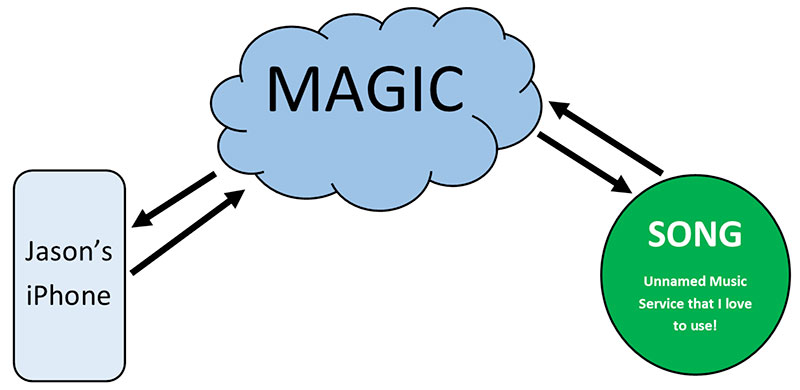
I’ll use myself for example…I have an iPhone that I want to listen to music on through an app since I don’t have the song I want to listen to downloaded to my phone. How in the world do I get that song? I go to the app, search for the song and push play. Yes, that is how I do it; but what is actually going on?

I think most people’s concept of the internet is this:

Concept of the Internet

For most people, this is actually all they WANT to know… either the magic is on or it’s not!

I’ll dive a little deeper (but not too much deeper I hope!) Nerd alert; this is kinda fun for me. If you’d rather just leave it to the magic, no need to read any further!

For you brave souls that have ventured beyond to this sentence, here we go!

Simply put, the internet is a bunch of computers all connected to each other through different data transport mediums (WiFi, fiber optics, etc.) where people are able to get information from one device to another.

Using the same example, here is another (more accurate but still VERY simple) version of how I get to list to the song on my phone.

More Accurate Concept of the Internet

That is still VERY simple; because what does an ISP Network look like?

Glad you asked!

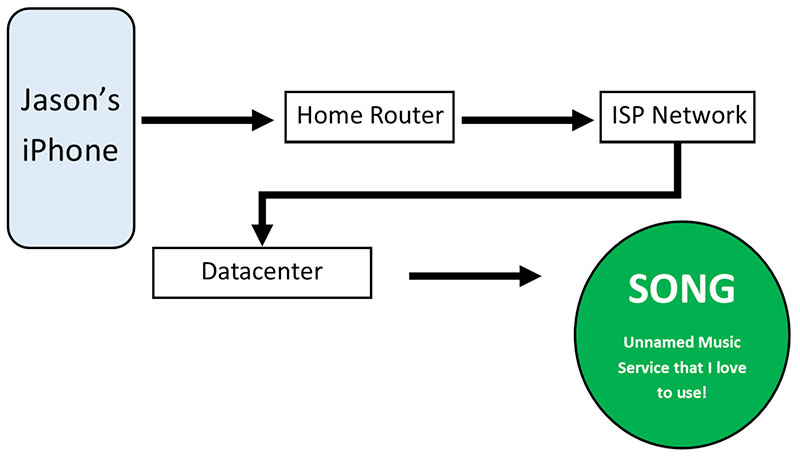
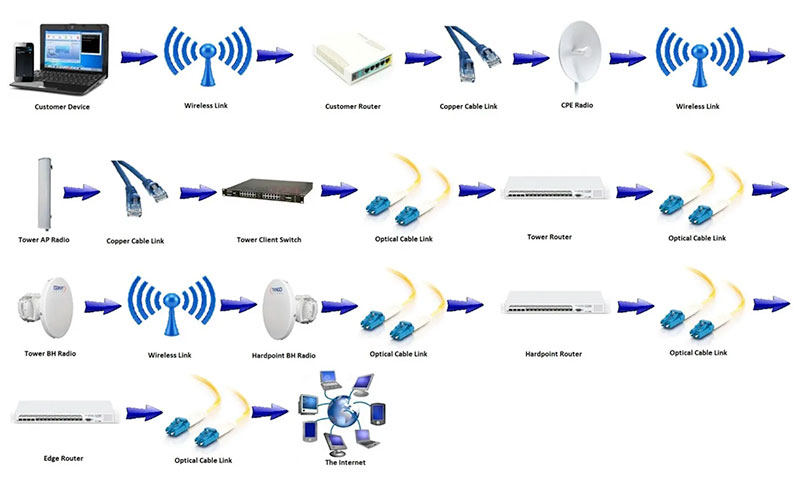
Since we can only speak for ourselves, and because we are predominately a WISP (Wireless Internet Service Provider) this is what it looks like going from a device (like my iPhone) out to the datacenter that has the song I want to listen to:

Even More Accurate Concept of the Internet

Again, this is very simplified, but I found it super helpful when I first started working at Alyrica!

Solution oriented, friendly customer service; that’s Alyrica!

Do Data Caps Matter?

Do Data Caps Matter?

There is some debate around data-caps (or usage limits) and what they mean when using the internet.

Data caps are how much data you are able to use in total in a given period (think of it like a water meter). Internet generally is charged on a monthly basis, so the data cap resets every month. Data caps shouldn’t be confused with bandwidth. Bandwidth is more like the water pressure; how fast a person can get the data.

Depending on the internet company, the data caps can be fairly cost prohibitive if someone is using their connection excessively. For example, if you are watching Netflix in High Definition (HD), you will use ~1Gigabyte(GB)/hour. That said, if you have a data cap of 100GB, you would be able to watch 100 hours of HD Netflix that month and then either be throttled down (significantly slowing your connection) OR being charged for every GB you use above the data cap. (Reference)

The first time I experienced this myself was using a mobile hot spot with a data cap of 2GB while I was spending time in Montana. Needless to say I wasn’t watching Netflix on it, but was amazed at how quickly I used up the 2GB! The result of me using the connection for a week was that the data cap was used up and then my connection was throttled so slow that it was difficult to even check email on the connection. Since I still had to work I called up the provider and had to purchase 4GB more for the month since I figured I could get by with that.

So to answer the question, ‘Do Data Caps Matter?’, the answer is they don’t until you hit them, and then they matter A LOT!

One of the unique aspects of Alyrica is that we do not have data caps. We don’t believe people should be punished for actually using the connection that they are paying for!

No usage limits or data caps; that’s Alyrica!

Fixed Wireless vs Satellite Internet

Fixed Wireless vs Satellite Internet

One question we typically get from customers that first call us: “Is this Satellite Internet?”

Great question!

It is easy to see how people would confuse Fixed Wireless with Satellite. Fixed Wireless and Satellite BOTH need a dish mounted to the property. Both need clear line of site, both are more readily available in rural areas and both can get you online. That is about where the similarities end.

The biggest difference (and the one that most people care about) is latency. Yes, you will hear that word a lot on this blog, because latency is a BIG deal. The short version: latency has to do with how fast something loads. For example if you hit ‘GO’ on a website, the latency is how fast that website can respond. All of this happens in milliseconds (ms) which is fast; but if there is A LOT of data that needs to go and come back, all those milliseconds add up to seconds and becomes noticeable.

According to Wikipedia, Satellite Average Latency is 550 ms (https://en.wikipedia.org/wiki/Satellite_Internet_access).

In contrast, Alyrica Fixed Wireless Average Latency is > 25 ms. What that means in real life is that the website comes back 25 Times Faster on Alyrica Fixed Wireless than over Satellite Internet! That will be a noticeable difference!

Why such a big difference?

Simple, when people send a signal to a satellite it needs to travel to space (over 22,000 miles above earth) and then it needs to come back down. Even at the speed of light, that’s a LONG way to travel. When someone is on fixed wireless, the signal needs to travel to one of our towers (between 5-10 miles away) and then to one of our data centers right here in Oregon (Portland or Eugene). That’s not even a hundred miles in most cases! This means that ‘the internet’ is approximately 22,000 miles closer via Fixed Wireless than Satellite.

This difference is so extreme in fact that many people who work remotely (especially if it is a US government position) are not allowed to use Satellite Internet as it is not practically functional. Yes, even though you are able to get 25 Mbps download via satellite, it isn’t as helpful as a 3 Mbps connection via fixed wireless due to the high latency.

Who would use satellite then?

Satellite Internet is great for people that have no other options.

That’s where Alyrica comes in!

Chances are, if you are reading this, Alyrica can be your best option over satellite.

Alyrica has helped people move off of Satellite Internet in rural areas throughout the Mid-Willamette Valley who thought that there was no other option available. The difference is drastic, and these customers that we have helped cannot say enough great things about how Alyrica Fixed Wireless has been a game changer for them!

How do I know if I can get Alyrica?

Alyrica Fixed Wireless does need clear line of sight (LOS) in order to make sure you can get signal. The dish that we mount needs to be able to clearly see the tower that we are connecting you to. By checking our website or giving us a call, we run a path analysis which give us accurate information to see if we would be able to get you online. The path analysis isn’t perfect, but it gets us in the ballpark to know if we should send an installer out to do an install.

Even if you’re surrounded by trees; we have installed dishes in trees all over the valley in order to get customers online!

Solution Oriented, Friendly Customer Service; that’s Alyrica!

How Much Speed Do I Need?

How Much Internet Speed Do I Need?

Before I came to work at Alyrica, I didn’t have any idea what Mbps (Megabits per second) even meant…I figured, like most people I think, that the higher the number, the faster the internet, and therefore the better the internet experience, right?

Kinda…

An analogy that I heard is that Mbps is like a pipe going to your house. The bigger the number, the bigger the pipe. It is only helpful having a big pipe to your house if there is the water pressure to fill that pipe in a constant stream. What many internet companies do is sell you the big pipe and then turn on a trickle through the pipe, because in reality that is what most people use.

What do you typically do online?

This is the real question to be asked. That’s why we created our plans around this question.

The most common thing that we hear our customers want to do online is web browsing, email, social media and streaming (Netflix, Hulu, etc.)

Netflix for example needs 3 Mbps for DVD quality streaming and 5 Mbps for HD quality. Most people want to have a little bit of headroom over that so that they can watch Netflix and still be on Facebook. Our Standard Plan (up to 8 Mbps) would allow for Netflix streaming on one device and then checking Facebook on another.

If you have multiple people watching multiple streams simultaneously, you would then need the bandwidth for all those streams to come in at once.

Using the above analogy, we hook up the ‘pipe’ that makes sense for what you actually need and have the water pressure to keep that flow up as much and as long as you want (no throttling, no data caps, just straightforward internet…that’s refreshing isn’t it?)

Here are our Residential Plans that are designed to actually fit what you need!

Transparent Pricing, No Usage Limits; that’s Alyrica!